
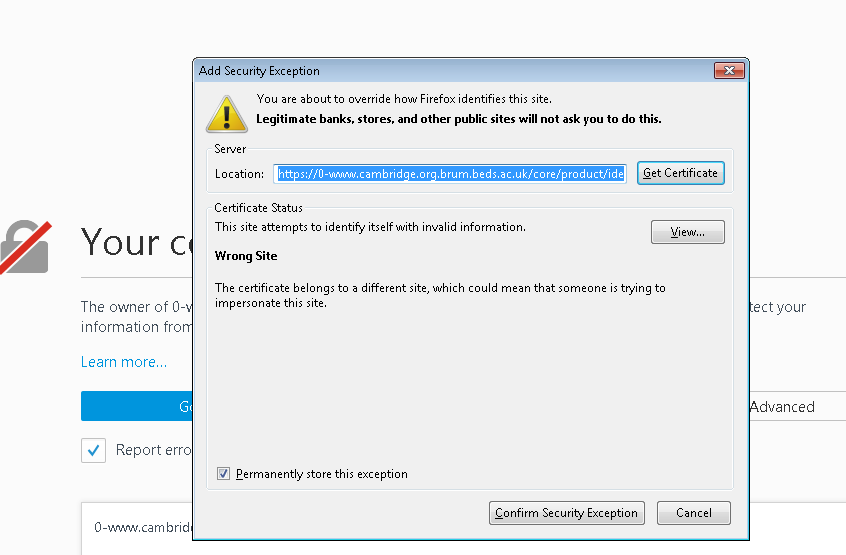
We are having some issues using the library system to connect to resources which use https, resulting in messages like this:
or this:
Rest assured that if you've come through the library catalogue or DISCOVER, and the link you're trying to access has brum.beds.ac.uk in the URL, then it's just a technical hitch not a real security risk. You can safely click Add Exception and then Confirm Security Exception.
Showing posts with label security certificates. Show all posts
Monday, 26 September 2016
Thursday, 17 March 2016
Springer journals
The University subscribes to a few journals from the Springer who have recently reconfigured their web settings and this is causing a few browser problems. If you click into a journal from the library catalogue and you may get a message like the above if it is a Springer title. This is an example from Chrome but it will look pretty similar on Safari and Firefox.
To get into the journal, click on the Advanced button and select the option to Proceed (or 'Add Exception').
In the meantime, we will try to work with Springer to find a fix so this problem disappears.
Friday, 19 February 2016
Oxford University Press Journals: secure certificate issue
| Example from Firefox |
The University subscribes to a few journals from the Oxford University Press who have recently reconfigured their web settings and this is causing a few browser problems. If you click into a journal from the library catalogue and you get a message like the above. This is an example from Firefox but it will look pretty similar on Safari and Chrome.
To get into the journal, click on the Advanded button and select the option to Add Exception.
In the meantime, we will try to work with OUP to find a fix so this problem disappears.
Subscribe to:
Posts (Atom)


